
Multi-Agent AI Systems Are Eating Single Agents. Here's How to Build One That Works.
Single-agent architectures hit a wall the moment your task needs planning, research, and execution in parallel. Multi-agent systems solve this — but most tutorials skip the hard parts. This guide doesn't.
You built a single AI agent. It has tools. It has a system prompt. It reasons through problems step by step. It works great — until you ask it to do two things at once.
"Research competitor pricing, then write a report, then fact-check the report against our internal data." Your single agent tries to do all three sequentially. It burns through your context window by step two. By step three, it has forgotten half of what it researched. The report contradicts itself. Your stakeholder reads it, politely says "this isn't quite right," and goes back to doing it manually.
This is not a prompt engineering problem. It is not a model capability problem. It is an architecture problem. You gave one agent three jobs that require three different skill sets, three different tool configurations, and three different evaluation criteria. No single system prompt can hold all of that without tradeoffs.
The industry figured this out. Gartner reported a 1,445% surge in multi-agent system inquiries between Q1 2024 and Q2 2025. LangGraph crossed 126,000 GitHub stars. CrewAI hit 44,600. Every serious AI engineering team is moving from "one big agent" to "a team of specialized agents that coordinate."
But most tutorials show you the happy path: three agents in a loop, no error handling, no state management, no production concerns. This guide covers the real architecture — including the parts that break.
Why Single Agents Hit a Ceiling
Single agents fail at compound tasks for three structural reasons:
1. Context Window Contamination
A single agent doing research, analysis, and writing accumulates context from every step. By the time it reaches the writing phase, its context window contains raw search results, intermediate reasoning, failed tool calls, and correction attempts. The signal-to-noise ratio collapses. The model cannot distinguish between "information I gathered" and "information I should use."
2. Tool Configuration Conflicts
A research agent needs web search, document retrieval, and API access. A writing agent needs a style guide, templates, and formatting tools. A fact-checker needs source verification and citation tools. When you give all tools to one agent, it makes poor tool selection decisions. It will use web search when it should use internal retrieval. It will format when it should still be researching.
3. No Specialization, No Evaluation
A single agent cannot evaluate its own output against domain-specific criteria because it is using the same context for generation and evaluation. A dedicated fact-checker agent, with a fresh context window and a focused system prompt, catches errors that the original agent literally cannot see — because those errors are part of the context that generated them.
The Context Window Tax
In production benchmarks, single agents performing 3+ step compound tasks show a 35-50% quality degradation by the final step compared to the same model performing that step in isolation. This is not a model limitation — it is a context management failure that multi-agent architectures solve by giving each agent a clean slate.
The Three Multi-Agent Architectures
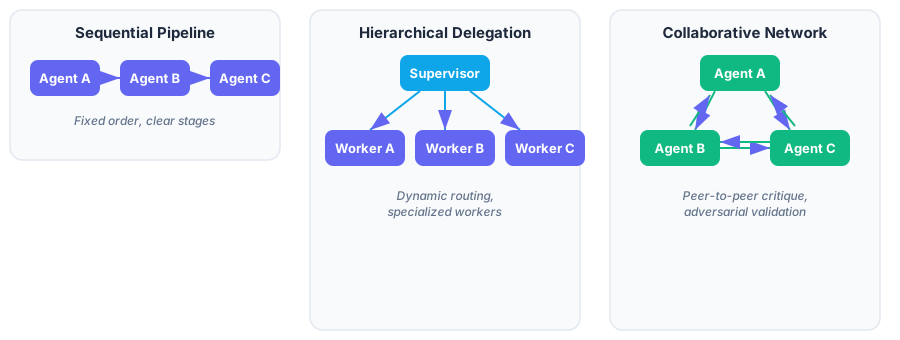
Not all multi-agent systems are the same. There are three dominant patterns, each suited to different problem structures.
Sequential Pipeline
Agents execute in a fixed order. Agent A's output becomes Agent B's input. Best for workflows with clear stages: research → draft → review → publish.
When to use: The task has a natural order. Each stage has clear input/output contracts. You need predictable execution time.
When it breaks: Any agent in the chain fails and there is no fallback. Earlier agents cannot benefit from later agents' feedback without re-running the entire pipeline.
Hierarchical Delegation
A supervisor agent receives the task, decomposes it, delegates subtasks to specialized worker agents, and synthesizes their outputs. This is the most common production pattern.
When to use: Tasks are decomposable. Workers have different tool sets. You need dynamic routing — the supervisor can assign different workers based on the input.
When it breaks: The supervisor becomes a bottleneck. If it misunderstands the task, it delegates incorrectly and every worker produces irrelevant output. Supervisor quality is the ceiling for the entire system.
Collaborative Network
Agents communicate peer-to-peer, critiquing and refining each other's work. Often used for adversarial validation — one agent generates, another attacks, a third resolves.
When to use: Quality matters more than speed. The task benefits from multiple perspectives. You need adversarial checking (legal, compliance, safety).
When it breaks: Without termination conditions, agents can loop forever. Three agents politely disagreeing with each other at $0.01/turn adds up fast.
Framework Decision Matrix
Before writing code, you need to pick a framework. Here is the honest comparison based on production use — not marketing pages.
| Criterion | LangGraph | CrewAI | OpenAI Agents SDK | Claude Agent SDK |
|---|---|---|---|---|
| Architecture | Directed graph with state machines | Role-based crews with task delegation | Imperative handoff chains | Tool-use chain with sub-agents |
| Model lock-in | None (any LLM) | None (any LLM) | OpenAI only | Claude only |
| State management | Built-in checkpointing with time-travel | Sequential task output passing | Ephemeral context variables | Conversation-scoped |
| Streaming | Per-node token streaming | Limited | Full streaming | Full streaming |
| Human-in-the-loop | First-class support with breakpoints | Basic callback support | Via guardrails | Via tool approval |
| Observability | LangSmith integration | Basic logging | Built-in tracing | Built-in tracing |
| Learning curve | Steep (1-2 weeks) | Gentle (hours) | Minimal | Minimal |
| Best for | Complex stateful workflows | Fast prototyping, role-based teams | Quick single-model agents | Code-centric tasks |
Framework Lock-in Is Real
Choosing a model-locked SDK (OpenAI Agents SDK, Claude Agent SDK) trades flexibility for simplicity. This works until the model provider raises prices, has an outage, or a competitor releases a better model for your use case. Model-agnostic frameworks (LangGraph, CrewAI) cost more setup time but let you swap models without rewriting your orchestration layer.
Building a Multi-Agent Research System with LangGraph
Let's build something real: a research system where a Planner decomposes queries, a Researcher gathers information, a Writer produces the output, and a Reviewer validates quality. This is the hierarchical delegation pattern.
Step 1: Define the Shared State
Every agent in LangGraph reads from and writes to a shared state object. This is the contract between agents — get it wrong and agents will talk past each other.
from typing import TypedDict, Annotated, Literal
from langgraph.graph import StateGraph, END, START
from langgraph.graph.message import add_messages

class ResearchState(TypedDict):
    """Shared state passed between all agents in the graph."""
    query: str                                    # Original user query
    plan: list[str]                               # Decomposed sub-tasks
    research_results: Annotated[list, add_messages]  # Accumulated findings
    draft: str                                    # Written output
    review_feedback: str                          # Reviewer's assessment
    review_passed: bool                           # Gate: did the draft pass?
    revision_count: int                           # Safety valve for loops
    status: str                                   # Current pipeline stage
The Annotated[list, add_messages] pattern tells LangGraph to append new research results rather than overwrite them. Without this, each researcher call would erase the previous one's findings.
Step 2: Build the Agent Nodes
Each node is a Python function that takes the current state and returns a partial state update. This is where your LLM calls live.
from anthropic import Anthropic

client = Anthropic()

def planner_node(state: ResearchState) -> dict:
    """Decompose the query into research sub-tasks."""
    response = client.messages.create(
        model="claude-sonnet-4-6",
        max_tokens=1024,
        system="""You are a research planner. Given a query, decompose it
        into 2-4 specific, searchable sub-questions. Return each
        sub-question on its own line. Nothing else.""",
        messages=[{"role": "user", "content": state["query"]}],
    )
    plan = [
        line.strip()
        for line in response.content[0].text.strip().split("\n")
        if line.strip()
    ]
    return {"plan": plan, "status": "planned"}


def researcher_node(state: ResearchState) -> dict:
    """Research each sub-task and accumulate findings."""
    findings = []
    for sub_task in state["plan"]:
        response = client.messages.create(
            model="claude-sonnet-4-6",
            max_tokens=2048,
            system="""You are a research analyst. Given a specific question,
            provide a thorough, factual analysis with concrete data points.
            Cite your reasoning. Be precise, not verbose.""",
            messages=[{"role": "user", "content": sub_task}],
        )
        findings.append(f"## {sub_task}\n\n{response.content[0].text}")
    return {
        "research_results": findings,
        "status": "researched",
    }


def writer_node(state: ResearchState) -> dict:
    """Synthesize research into a coherent report."""
    research_context = "\n\n---\n\n".join(state["research_results"])
    feedback_note = ""
    if state.get("review_feedback"):
        feedback_note = (
            f"\n\nPrevious review feedback to address:\n"
            f"{state['review_feedback']}"
        )
    response = client.messages.create(
        model="claude-sonnet-4-6",
        max_tokens=4096,
        system=f"""You are a technical writer. Synthesize the research below
        into a clear, well-structured report that directly answers the
        original query. Use specific data points from the research.
        Do not invent facts.{feedback_note}""",
        messages=[
            {"role": "user", "content": (
                f"Original query: {state['query']}\n\n"
                f"Research findings:\n{research_context}"
            )},
        ],
    )
    return {
        "draft": response.content[0].text,
        "status": "drafted",
    }


def reviewer_node(state: ResearchState) -> dict:
    """Evaluate the draft for accuracy and completeness."""
    response = client.messages.create(
        model="claude-sonnet-4-6",
        max_tokens=1024,
        system="""You are a fact-checking reviewer. Evaluate this report
        against the research findings. Check for:
        1. Claims not supported by the research
        2. Missing key findings from the research
        3. Logical inconsistencies
        Respond with APPROVED if the report passes all checks.
        Otherwise, respond with REVISION NEEDED: followed by specific
        feedback.""",
        messages=[
            {"role": "user", "content": (
                f"Report:\n{state['draft']}\n\n"
                f"Research findings:\n"
                + "\n---\n".join(state["research_results"])
            )},
        ],
    )
    review_text = response.content[0].text.strip()
    passed = review_text.upper().startswith("APPROVED")
    return {
        "review_feedback": review_text,
        "review_passed": passed,
        "revision_count": state.get("revision_count", 0) + 1,
        "status": "approved" if passed else "needs_revision",
    }
Step 3: Wire the Graph with Conditional Edges
This is where LangGraph shines. The conditional edge after the reviewer creates a feedback loop — the writer gets another shot if the review fails, but only up to a limit.
def should_revise(state: ResearchState) -> Literal["writer", "end"]:
    """Route based on review outcome and revision count."""
    if state["review_passed"]:
        return "end"
    if state["revision_count"] >= 3:
        # Safety valve: accept the draft after 3 attempts
        return "end"
    return "writer"


# Assemble the graph
workflow = StateGraph(ResearchState)

# Add nodes
workflow.add_node("planner", planner_node)
workflow.add_node("researcher", researcher_node)
workflow.add_node("writer", writer_node)
workflow.add_node("reviewer", reviewer_node)

# Wire edges
workflow.add_edge(START, "planner")
workflow.add_edge("planner", "researcher")
workflow.add_edge("researcher", "writer")
workflow.add_edge("writer", "reviewer")
workflow.add_conditional_edges("reviewer", should_revise, {
    "writer": "writer",
    "end": END,
})

# Compile
app = workflow.compile()
Step 4: Run It
result = app.invoke({
    "query": "What are the cost and latency tradeoffs of running "
             "open-weight LLMs on-device vs. cloud API inference "
             "for mobile applications in 2026?",
    "plan": [],
    "research_results": [],
    "draft": "",
    "review_feedback": "",
    "review_passed": False,
    "revision_count": 0,
    "status": "started",
})

print(result["draft"])
print(f"\nRevisions required: {result['revision_count']}")
print(f"Final status: {result['status']}")
Here is the full execution flow:

The Same System in CrewAI — Half the Code, Half the Control
If LangGraph is the manual transmission, CrewAI is the automatic. You define roles and tasks. The framework handles orchestration. Here is the same research pipeline:
from crewai import Agent, Task, Crew, Process

planner = Agent(
    role="Research Planner",
    goal="Decompose complex queries into specific research sub-questions",
    backstory="You are a senior research strategist who excels at "
              "breaking down complex topics into focused investigations.",
    verbose=False,
)

researcher = Agent(
    role="Research Analyst",
    goal="Gather thorough, factual information with concrete data points",
    backstory="You are a meticulous analyst who prioritizes accuracy "
              "and always supports claims with evidence.",
    verbose=False,
)

writer = Agent(
    role="Technical Writer",
    goal="Synthesize research into clear, well-structured reports",
    backstory="You are a technical writer known for turning complex "
              "research into accessible, authoritative content.",
    verbose=False,
)

reviewer = Agent(
    role="Fact-Checking Reviewer",
    goal="Validate report accuracy against source research",
    backstory="You are an editor who catches unsupported claims, "
              "missing context, and logical gaps.",
    verbose=False,
)

# Define tasks with explicit dependencies
plan_task = Task(
    description="Decompose this query into 2-4 research sub-questions: "
                "{query}",
    expected_output="A numbered list of specific research sub-questions",
    agent=planner,
)

research_task = Task(
    description="Research each sub-question from the plan thoroughly. "
                "Provide factual analysis with data points.",
    expected_output="Detailed findings for each sub-question",
    agent=researcher,
)

write_task = Task(
    description="Write a comprehensive report synthesizing all research "
                "findings. Address the original query directly.",
    expected_output="A well-structured technical report",
    agent=writer,
)

review_task = Task(
    description="Fact-check the report against the research. Verify all "
                "claims are supported. Flag any gaps or errors.",
    expected_output="APPROVED or specific revision feedback",
    agent=reviewer,
)

crew = Crew(
    agents=[planner, researcher, writer, reviewer],
    tasks=[plan_task, research_task, write_task, review_task],
    process=Process.sequential,
    verbose=False,
)

result = crew.kickoff(inputs={"query": "Cost and latency tradeoffs..."})
The tradeoff is visible in the code. CrewAI requires no state schema, no edge wiring, no routing functions. But you also lose: checkpointing (if it fails at step 3, you restart from step 1), conditional loops (no built-in revision cycle), per-node streaming, and human-in-the-loop breakpoints.
Use CrewAI when you need a working multi-agent prototype in an afternoon. Use LangGraph when you need production-grade state management, error recovery, and observability.
Production Hardening: What the Tutorials Skip
Getting a multi-agent system to run is easy. Getting it to run reliably at 3am when your on-call engineer is asleep is another matter entirely.
Cost Control
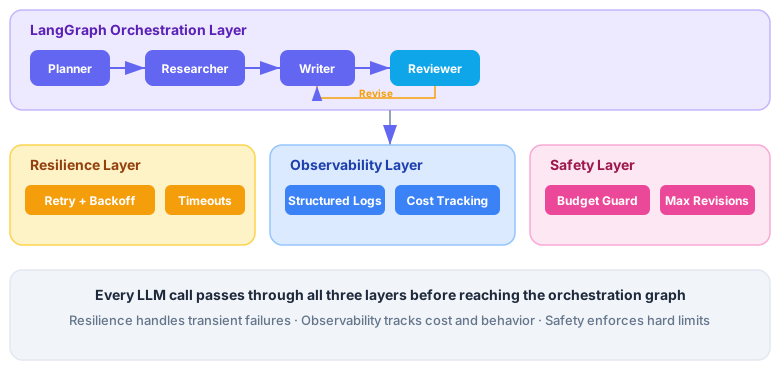
Multi-agent systems multiply your API costs by the number of agents times the number of iterations. A four-agent pipeline with a revision loop can easily make 8-12 LLM calls per user request.
# Add token tracking to every node
import tiktoken

class CostTracker:
    def __init__(self, max_budget_usd: float = 0.50):
        self.total_input_tokens = 0
        self.total_output_tokens = 0
        self.max_budget = max_budget_usd

    def track(self, response) -> None:
        self.total_input_tokens += response.usage.input_tokens
        self.total_output_tokens += response.usage.output_tokens

    @property
    def estimated_cost(self) -> float:
        # Claude Sonnet 4.6 pricing
        input_cost = (self.total_input_tokens / 1_000_000) * 3.00
        output_cost = (self.total_output_tokens / 1_000_000) * 15.00
        return input_cost + output_cost

    def check_budget(self) -> None:
        if self.estimated_cost > self.max_budget:
            raise BudgetExceededError(
                f"Request cost ${self.estimated_cost:.4f} "
                f"exceeds budget ${self.max_budget:.2f}"
            )
Timeout and Retry Logic
Each agent node should have independent timeout and retry logic. A researcher hitting a rate limit should not kill the entire pipeline.
import asyncio
from tenacity import retry, stop_after_attempt, wait_exponential

@retry(
    stop=stop_after_attempt(3),
    wait=wait_exponential(multiplier=1, min=2, max=30),
)
async def resilient_llm_call(client, **kwargs):
    """LLM call with exponential backoff."""
    return await asyncio.wait_for(
        client.messages.create(**kwargs),
        timeout=60.0,  # Per-call timeout
    )
Structured Logging for Debugging
When four agents are collaborating, "something went wrong" is useless. You need to know which agent, at which step, with what input, produced what output.
import structlog

logger = structlog.get_logger()

def researcher_node(state: ResearchState) -> dict:
    logger.info(
        "researcher.start",
        sub_tasks=len(state["plan"]),
        revision_count=state.get("revision_count", 0),
    )
    # ... LLM call ...
    logger.info(
        "researcher.complete",
        findings_count=len(findings),
        total_chars=sum(len(f) for f in findings),
    )
    return {"research_results": findings, "status": "researched"}
The Production Architecture
Here is what the full system looks like with all the hardening layers in place:
Common Mistakes and How to Avoid Them
After building and debugging multi-agent systems, these are the failure modes I see repeatedly:
| Mistake | What Happens | Fix |
|---|---|---|
| No revision limit | Reviewer and writer loop forever, burning tokens | Hard cap at 3 revisions with accept-and-warn |
| Shared system prompts | Agents compromise on everything, excel at nothing | Each agent gets a focused, single-purpose prompt |
| Passing full context between agents | Later agents drown in irrelevant information | Pass structured summaries, not raw conversation history |
| No cost tracking | A runaway loop costs $50 before anyone notices | Budget guard that kills the pipeline at a threshold |
| Synchronous everything | 4 research sub-tasks run sequentially when they could parallelize | Use asyncio.gather() for independent sub-tasks within a node |
| Testing agents end-to-end only | Failures are impossible to diagnose | Unit test each node in isolation with fixed state inputs |
When You Don't Need Multi-Agent
Multi-agent systems are not always the answer. Use a single agent when:
- The task has one clear objective and one tool set
- Context window requirements are under 50% of the model's limit
- Latency matters more than quality (multi-agent adds 3-10x latency)
- Your budget is tight (multi-agent multiplies costs by agent count)
The right question is not "should I use multi-agent?" but "does my task require different expertise at different stages?" If the answer is yes, you need multiple agents. If the answer is "it's complicated but one agent with good prompting could handle it," start with one agent and split later when you hit quality ceilings.
What's Next
Multi-agent architectures are moving fast. Three developments to watch:
- LangGraph's remote graph execution — deploy individual agent nodes as separate services that scale independently. The planner runs on a small instance, the researcher scales horizontally.
- MCP as the agent communication layer — Model Context Protocol is becoming the standard for giving agents access to external tools. Instead of hardcoding tools per agent, agents discover capabilities via MCP servers.
- Persistent agent memory — agents that remember across sessions, not just within a single pipeline run. LangGraph's checkpointing already enables this; expect tighter framework-level support in 2026 H2.
The shift from single agents to multi-agent systems is the same shift that happened from monolithic to microservice architectures. The same tradeoffs apply: more power, more complexity, more failure modes to handle. But for compound AI tasks that need real quality, there is no going back.
References and Further Reading
- LangGraph Documentation — Graph API Overview — Official LangGraph docs covering StateGraph, nodes, edges, and conditional routing.
- LangGraph GitHub Repository — Source code and examples for building resilient language agents as graphs.
- AI Agent Trends 2026 Report — Google Cloud — Google's analysis of the agentic AI landscape and multi-agent adoption trends.
- Best Multi-Agent Frameworks in 2026: LangGraph, CrewAI, and More — Framework comparison covering production readiness, streaming, and state persistence.
- 2026 AI Agent Framework Showdown: Claude Agent SDK vs Strands vs LangGraph vs OpenAI Agents SDK — Detailed benchmarking of the major agent frameworks.
- The Impact of AI on Software Engineers in 2026 — Pragmatic Engineer's analysis of how agentic AI is reshaping development workflows.
- What's Next in AI: 7 Trends to Watch in 2026 — Microsoft — Microsoft's outlook on multi-agent systems, persistent agents, and repository intelligence.
- 10 Things That Matter in AI Right Now — MIT Technology Review — MIT Tech Review's roundup of the most significant AI developments in 2026.
Was this article helpful?
Related Posts
AI Agents Keep Dying in Production. The Fix Was Invented in 1986.
Your agent framework handles the happy path. Erlang's supervision trees handled telecom uptime for 40 years. Here's how to apply the same 'let it crash' philosophy to make AI agents self-healing.
Read moreThe LLM Gateway Pattern: Cut Your AI Bill 80% Without Touching a Prompt
Most LLM apps send every request to the most expensive model and re-pay for every duplicate question. The LLM Gateway pattern fixes both — with smart routing, semantic caching, and budget guards. Here is the production architecture, with code.
Read moreNaive RAG Is Dead. Here's What Replaced It.
Most RAG pipelines retrieve garbage, stuff it into context, and pray. Agentic RAG replaces the prayer with a judge, a retry loop, and a routing layer that actually works.
Read moreComments
No comments yet. Be the first to share your thoughts!